

When I first saw the new SharePoint Copilot App, I have to admit my first reaction was:
Wait… are they trying to replace us? (SharePoint Architects, Developers, Consultants)
Of course, after spending some time exploring it, I realized that’s not the point at all. What Microsoft is really trying to achieve is perfectly captured by this idea:
Every one of those steps had the same goal: shorten the distance between ‘I have a business problem’ and ‘I have a working solution.
And that’s exactly why I think this is such an important step. For years, I’ve been helping organizations translate business requirements into working SharePoint solutions. That process often involved hours-or even days-of planning, configuring, building, and refining. Tools like this don’t replace that expertise, they reduce the gap between an idea and a working solution. They help us prototype faster, validate ideas earlier, and deliver value to the business much sooner. The real value is not that AI builds everything for us. The real value is that it removes repetitive work, accelerates delivery, and allows us to spend more time on what actually matters: architecture, governance, security, user experience, integration, and solving complex business problems.
I don’t see it as a threat. I see it as another powerful tool that helps us deliver better solutions, faster. The role of a SharePoint Architect or Consultant isn’t disappearing. It’s evolving.
What is the new SharePoint Copilot App experience? How could I build something?
At its core, the experience is deceptively simple. You open Copilot and type something like:
Create an app to manage employee onboarding. Track new hires, their start date, assigned buddy, IT equipment requests, and a checklist of onboarding tasks with due dates and owners
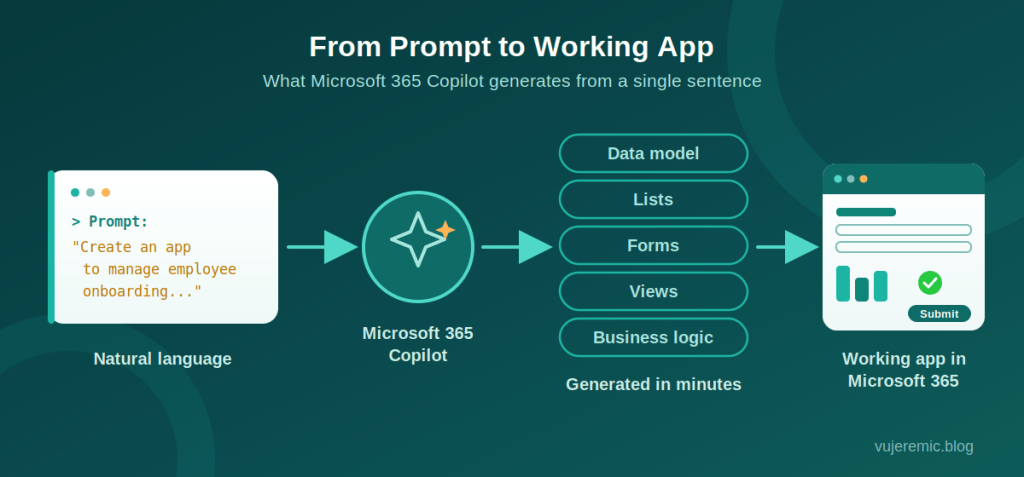
From that single prompt, Copilot does what would normally take a consultant a day or two of workshops and clicking:
- It generates the data model. Copilot infers the entities from your description — new hires, tasks, equipment — and figures out the columns, data types, and relationships between them. Lookups included.
- It creates the SharePoint lists. Not empty shells, but properly structured lists with choice columns, people fields, dates, and sensible defaults. Often with sample data so you can immediately see how it behaves.
- It builds the forms. Input forms for creating and editing records, laid out logically, with required fields where they make sense.
- It configures the views. “Show me overdue tasks grouped by owner” is no longer a formatting exercise — it’s part of the prompt.
- It wires up basic business logic. Status transitions, conditional visibility, simple validation. The kind of logic that used to mean JSON formatting gymnastics or a quick Power Automate flow.
- It delivers a modern, responsive UI. The generated apps look like modern Microsoft 365 experiences — because they are. They work on desktop, in Teams, and on mobile without any extra effort.
- It’s natively integrated with Microsoft 365. The app lives in your tenant, respects your permissions, uses your identity model, and shows up where your users already work. No new hosting. No new login. No shadow IT platform.
And crucially, it’s iterative. You don’t have to get the prompt perfect. “Add an approval status field.” “Group the main view by department.” “Make the equipment list a lookup instead of free text.” You refine the app the same way you’d brief a junior developer – except the turnaround is seconds, not sprints.
Why this matters
Different audiences will feel this differently, and I think it’s worth spelling out.
Citizen developers finally get what Power Apps always promised but never quite delivered for the average user: app creation without a learning curve. No canvas, no formula bar, no “why is my gallery not refreshing.” Just describe and refine.
Business users stop waiting. The single biggest killer of good ideas in enterprises isn’t budget — it’s queue time. When a department head can stand up a working purchase request tracker before the next status meeting, ideas stop dying in backlogs.
Consultants should pay close attention. The billable hours we used to spend building basic list-and-form solutions are evaporating. That’s uncomfortable — and it’s also an opportunity. More on that below.
Architects get a new prototyping superpower. Instead of wireframes and mockups, you can put a working application in front of stakeholders in the first workshop. Requirements gathering with a live artifact is a different sport entirely.
The net effect: the time from idea to working solution collapses from weeks to minutes. Not for everything – but for a surprisingly large share of the applications that actually get requested in real organizations.
My Thoughts as a Microsoft Architect
I have spent years building SharePoint solutions across the whole stack – SharePoint Framework web parts and extensions, Power Platform apps and flows, Azure services glued in behind the scenes, Microsoft Teams solutions, Dataverse data models. A meaningful portion of that work has been exactly the kind of application Copilot now generates from a sentence. But after building with it, my dread has mostly turned into clarity.
I don’t believe AI replaces developers. I do believe – strongly – that it changes our role. And frankly, it changes it in a direction most of us have wanted for years.
Think about how much of a typical engagement was spent on work that required skill but not judgment. Creating lists. Configuring views. Building the same request-and-approve form for the fifteenth time. That work is going away, and I won’t miss it.
 Vukašin Jeremić - IT Blog
Leave a comment